
[ad_1]
In the digital age, photography has transformed from a niche hobby to a widely accessible form of expression. With the advent of smartphones and affordable cameras, anyone can capture stunning images. However, the real magic often happens in post-production. Photo editing is a crucial skill that can elevate your images from ordinary to extraordinary. This article will delve into the art of photo editing, covering essential tools, techniques, and best practices, allowing you to enhance your images like a pro.
Understanding the Basics of Photo Editing
Before diving into the complexities of photo editing, it is essential to grasp some fundamental concepts:
1. What is Photo Editing?
Photo editing can be defined as the process of manipulating and enhancing images to achieve a desired outcome. This may involve adjusting color balance, contrast, exposure, and sharpness, as well as cropping and retouching.
2. Why Edit Photos?
While a well-composed image may need minimal tweaks, editing can significantly enhance storytelling and emotional impact. Here are a few reasons why editing is crucial:
- Correcting Imperfections: No shot is perfect. Editing can help to eliminate distractions, correct lighting, and adjust color balance.
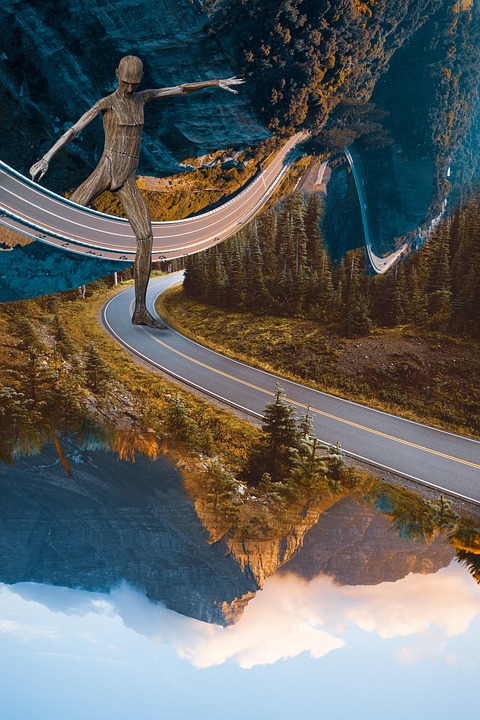
- Creative Expression: Editing allows photographers to express their unique vision, transforming ordinary scenes into extraordinary works of art.
- Consistency: For branding and professional portfolios, consistency in color, tone, and style is vital, and editing allows you to achieve that.
3. Essential Tools for Photo Editing
To begin your editing journey, you’ll need some quality software. Here are a few popular choices:
- Adobe Photoshop: The industry-standard software for photo editing, offering extensive features for retouching, compositing, and manipulating images.
- Adobe Lightroom: Ideal for beginners and professionals alike, it streamlines the editing process with non-destructive editing, allowing you to make adjustments without permanently altering the original image.
- Canva: A user-friendly graphic design tool that includes basic photo editing capabilities. Perfect for social media graphics and quick touch-ups.
- GIMP: A free and open-source alternative to Photoshop. It’s feature-rich and great for those on a budget.
Essential Editing Techniques
Once you have the proper tools, the next step is learning essential editing techniques. Here are some vital skills every photographer should master.
1. Cropping and Composition
Cropping is one of the first steps in photo editing. It allows you to remove distractions, improve composition, and focus attention on the subject. Consider the following tips:
- Rule of Thirds: Imagine dividing your image into nine equal parts with two horizontal and two vertical lines. Position points of interest along these lines or at their intersections.
- Remove Distractions: Cropping can eliminate unnecessary elements that take away from the main subject, leading to a more impactful image.
2. Exposure and Contrast
Exposure refers to the amount of light in an image. Adjusting exposure and contrast can greatly affect the mood and clarity of a photo:
- Exposure: Use sliders in your editing software to increase or decrease exposure levels. Be cautious not to overexpose bright areas or underexpose dark areas.
- Contrast: Increasing contrast can make an image more dynamic, while decreasing it can create a softer look. A balanced approach is crucial for natural results.
3. Color Correction
Color correction ensures that colors appear accurate and vibrant. Essential techniques include:
- White Balance: Adjusting the white balance can remove color casts. Use the ‘Temperature’ slider to make images warmer (more yellow) or cooler (more blue).
- Saturation and Vibrance: Increasing saturation enhances all colors, while vibrance only amplifies muted colors. Use these tools to enhance the overall color palette without over-saturating.
4. Sharpening and Cleaning Up
Sharpening enhances details, making images crisper and more defined. However, it’s important to strike a balance:
- Use Sharpening Filters: Explore the sharpening options in your software, adjusting settings to avoid a grainy appearance.
- Remove Noise: Low-light images may introduce noise (graininess). Use noise reduction tools to smooth out these imperfections.
5. Retouching
Retouching involves correcting blemishes and distractions on subjects. Whether you’re editing a portrait or a landscape, consider:
- Clone Stamp and Healing Brush: Use these tools to remove unwanted elements, blemishes, or distractions. They help blend corrections with the surrounding areas seamlessly.
- Frequency Separation: An advanced technique used in portrait retouching that separates texture from color, allowing for precise adjustments without affecting skin texture.
6. Filters and Presets
While filters can sometimes be overused, they can also add an artistic touch to your images:
- Presets: Lightroom offers presets that you can apply to streamline your editing process, providing a cohesive style across multiple images.
- Creative Filters: Experiment with filters to create specific moods, such as vintage looks or high-contrast styles. Always ensure the effect aligns with the image’s intended feel.
Crafting Your Editing Style
As you become comfortable with basic techniques, you can begin to develop and craft your editing style. Here are steps to help you define your voice:
1. Find Inspiration
Explore other photographers’ work and analyze their editing styles. Platforms like Instagram, Pinterest, and photography blogs can provide a wealth of inspiration.
2. Create Consistency
Once you identify a style you like, work on keeping your edits consistent across various images. This could involve using similar presets or adhering to consistent color tones and contrasts.
3. Experiment and Evolve
Don’t be afraid to step outside your comfort zone. Experiment with new techniques, blending different styles, and allowing your editing style to evolve over time.
Best Practices for Photo Editing
To make the most of your editing process, adhere to these best practices:
1. Organize Your Workflow
Efficiency is key when editing large batches of photos. Implement a structured workflow:
- Import and Organize: Start by importing images, organizing them into folders, and labeling them for easy access.
- Use Keywords: Tagging images with keywords can help you find them quickly in the future.
2. Back Up Your Files
Always back up your original files and edited versions. Cloud storage solutions or external hard drives can prevent disastrous data loss.
3. Take Breaks
During edit sessions, it’s easy to become overwhelmed or lose perspective. Take regular breaks to allow your eyes and mind to reset.
4. Continuous Learning
Photo editing software evolves continually. Stay updated with new features and tools by following tutorials online, attending workshops, and engaging with photography communities.
Conclusion
The art of photo editing is a powerful tool that allows photographers to enhance their images and communicate their vision effectively. By mastering essential techniques, developing a consistent style, and adhering to best practices, you can elevate your photography game significantly. Whether you’re a hobbyist or a professional, embracing the art of photo editing can unlock your creative potential.
Final Thoughts
Embrace the learning process, practice regularly, and allow your unique voice to shine through in your edits. As you enhance your images like a pro, remember that photo editing is not just about perfection; it’s about expressing your artistic vision and creating a lasting impact with your photos. Happy editing!
[ad_2]